
|
|
F6Plus |
F7SW |
F7SN |
F7SG |
|
Name |
Car TabPro Mini |
Car TabPro HD |
Truck TabPro |
Master TabPro |
|
Coverage |
Passenger vehicles |
Passenger vehicles |
Cummins, Detroit, Cat and MaxxForce engines, Allison, Bendix, Eaton |
All included, All-in-one |
|
Protocol |
OBD1, OBD2 |
OBD1, OBD2 |
J1708, J1939, OBD2 |
OBD1, OBD2, J1708, J1939 |
|
Adapter |
Over 10 |
Over 10 |
OBD16, Diesel 6-9 |
Over 20 |
|
MSRP |
$2000 |
$2295 |
$4595 |
Model |
If you are not 100% satisfied with your purchase, FCAR TECH USA, LLC offers returns within 30 days of receipt of shipment for a full refund, ONLY apply for fcarusa.com order.
F506 package including three type of adaptor:
- OBD II 16 adaptor, on main cable
- Diesel 6 Pin;
- Diesel 9 Pin
OBD II 16 covering:
- UD, Hino, Isuzu, Fuso are using OBD 16.
- Hino or UD might have Diesel 9 adaptor, this is only for Tranmission or ABS
- car or pickup OBD II
- Volvo/Mack 2013 and newer
Diesel 6 pin
- Diesel OBD, older than 2000
Diesel 9 pin
- Diesel OBD, most HD truck or equipment
Go to Settings, select User Info. Click on Edit and then type in Info and save it. But it has to be Wifi connected.
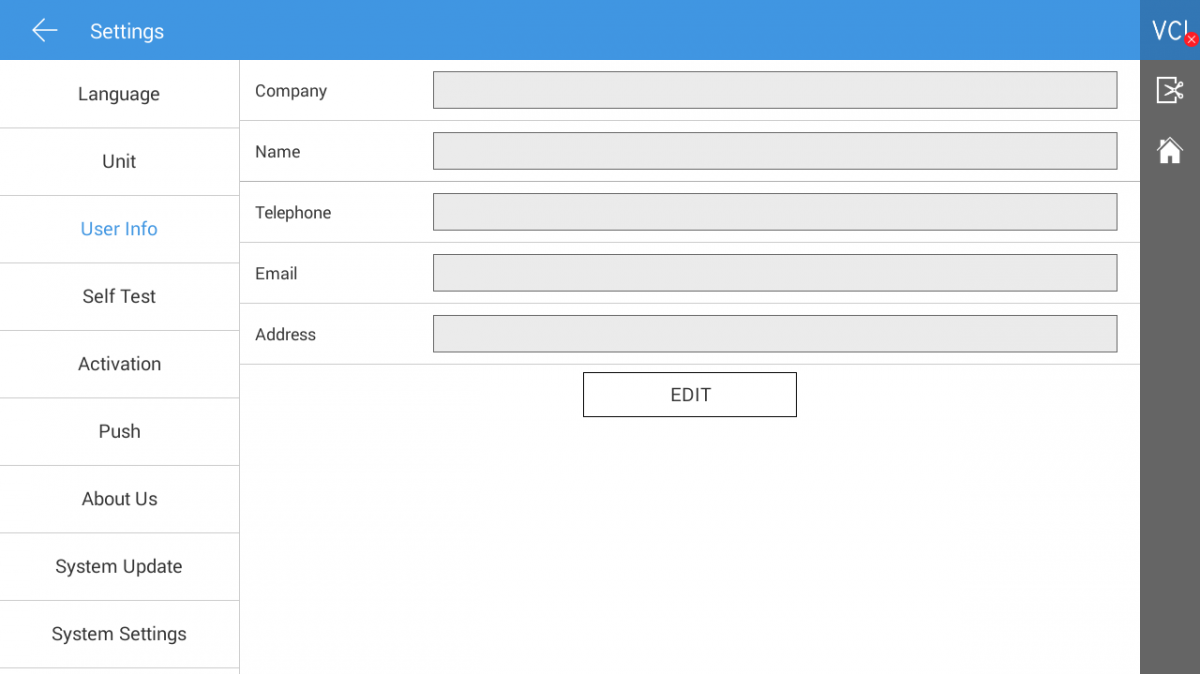
The FCAR tablet scanner supports two methods for internet connectivity:
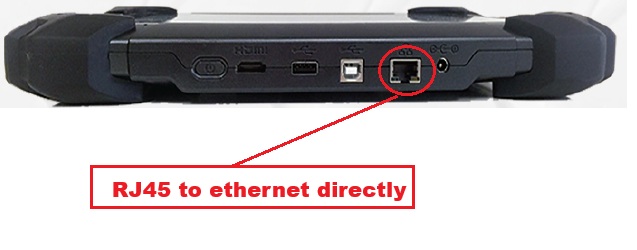
Method 1: Wired Connection (Ethernet - RJ45 Cable)
-
Plug in the RJ45 cable directly into the tablet’s Ethernet port.
-
Verify the connection – If the internet works immediately, no further steps are needed.
Method 2: Wireless Connection (Wi-Fi) (If Ethernet is not available)
-
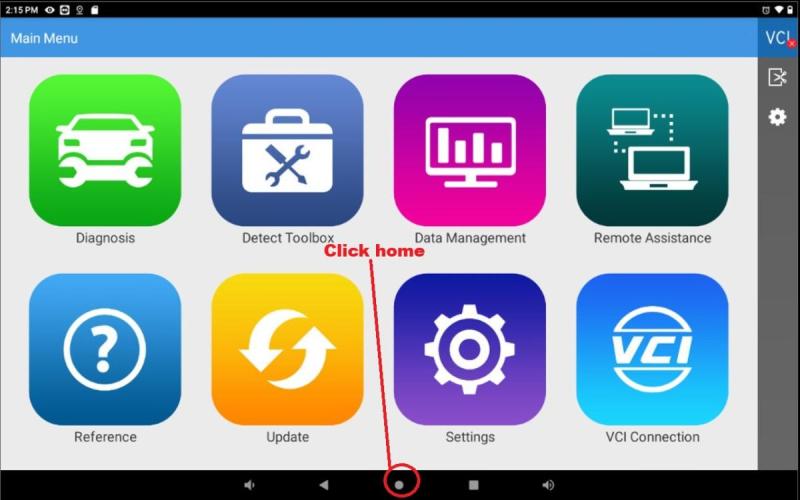
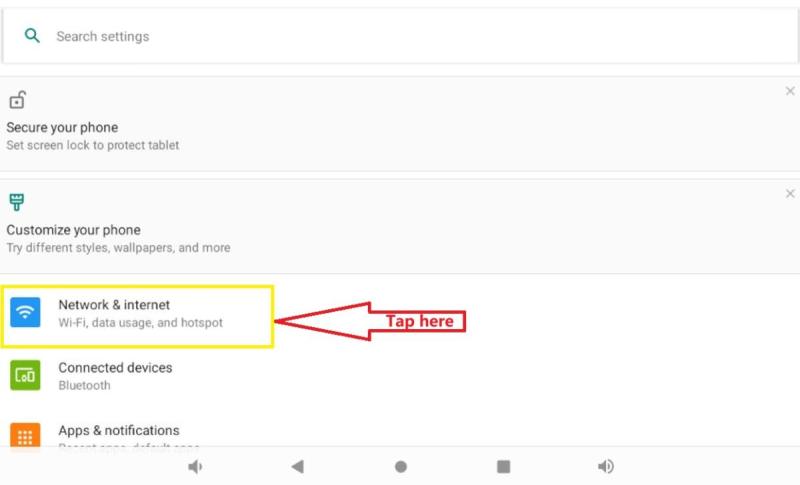
Go to the Desktop – Tap the circle icon at the bottom of the screen.
-
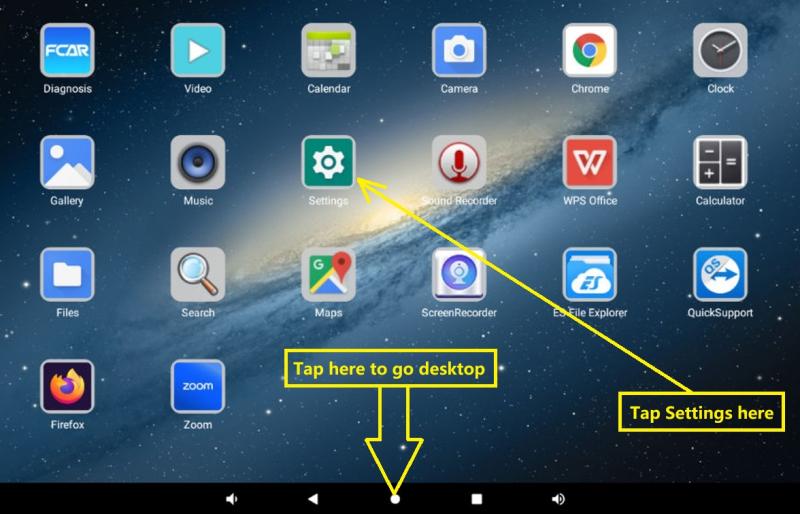
Open Settings – Tap the Settings app.
-
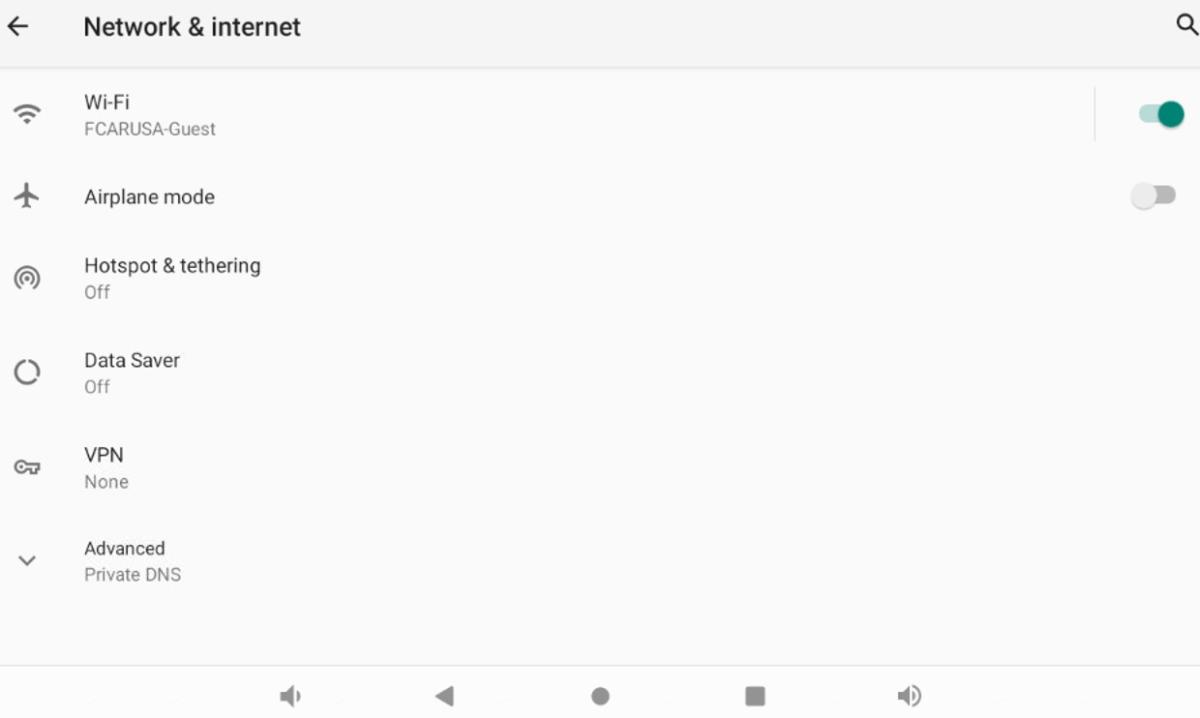
Select "Network & Internet" – Navigate to the Wi-Fi settings.
-
Connect to Wi-Fi –
-
Select your Wi-Fi network.
-
Enter the correct password/credentials.
-
-
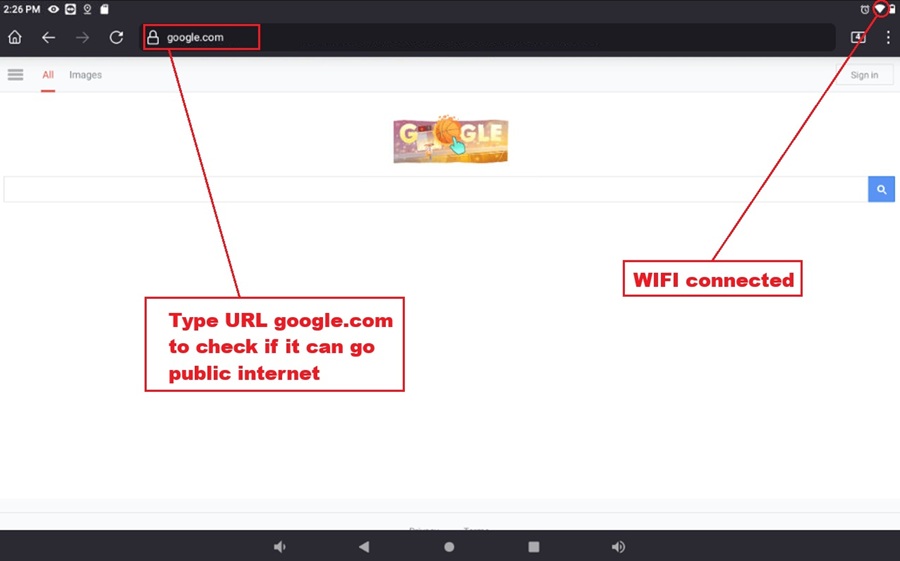
Verify Internet Access –
-
Open a browser (e.g., Firefox).
-
Visit a website like google.com to confirm connectivity.
-
(If required, log in again or accept any terms/agreements shown in the browser.)
-
The package has three type of adaptors:
- OBD II 16 adaptor, on main cable
- Diesel 6 Pin;
- Diesel 9 Pin
OBD II 16 covering:
- UD, Hino, Isuzu, Fuso are using OBD 16.
- Hino or UD might have Diesel 9 adaptor, this is only for Tranmission or ABS
- car or pickup OBD II
- Volvo/Mack 2013 and newer
Diesel 6 pin
- Diesel OBD, older than 2000
Diesel 9 pin
- Diesel OBD, most HD truck or equipment
All FCAR scanners in north america market, it has both English and Spanish, but be default it only load English. If you want to add Spanish support,
1) Login at www.fcar.com with your user name and password, and select download. and click on the Language drop down menu and select the language to download
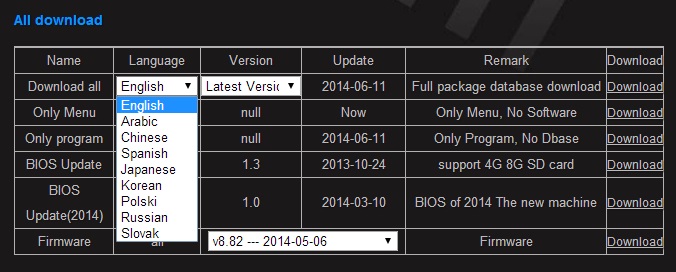
2) After download the package on your windows PC, click the software to run and select your SD card drive to do the update.
If your SD already has English software and want to keep English, don't format the SD card or remove English sofware in the SD card, you will keep original English software and plus the newer english you add. Switch the two language in your scanner by select your language setting in the scanner.
A: You can place an order online through www.fcarusa.com or by phone 844-FCAR-USA(322-7872). We accept all major credit card or paypal. Also you can place order by our local sale reps or distributors near your location
A: When you check www.fcarusa.com and pick the product you want to order, you will see "Financing as low as $xx" button. Click on the button, it will bring up a simple application form to fill up. Once submit the form, the 3rd party financial institute [QuickSpark] will review your application. They might need 24-48 hours to reponse your application. They also might ask for additional information. The item will be shipped at the same day after you get financing process done.
FCA Secure Gateway (SGW) Access
The FCAR Tech USA had been authorized to use AutoAuto to unlock the Secure Gateway Module (SGW). In 2018 FCA US implemented the Secure Gateway Module(SGW). Only FCA US approved Diagnostic Scan Tools that have been validated by FCA and adhere to their compliance protocols are authorized to access the Secure Gateway Module.
When do you need to access FCA gateway
When you are using FCAR scanner to scan FCA vehicle (ie. Dodge, RAM, Jeep, Chrysler) year 2018 and newer, and perform diagnostic procedures:
- Clear all DTC fault codes
- Actuation test
- Special functions
Coverage area:
United States, Canada or Mexico
FCA US SGW authorized FCAR Scanner models:
F4SN, F7SB, F7SN, F7SG, F6Plus, E81W, and F7SW
FCAR Tech Support
Tel: 844-322-7872 (FCARUSA) or email: support@fcarusa.com
How to register and use SGW in FCAR tablet scanners
| Step 1: Register your Workshop Accounts and Technician Accounts on AutoAuth | |
|
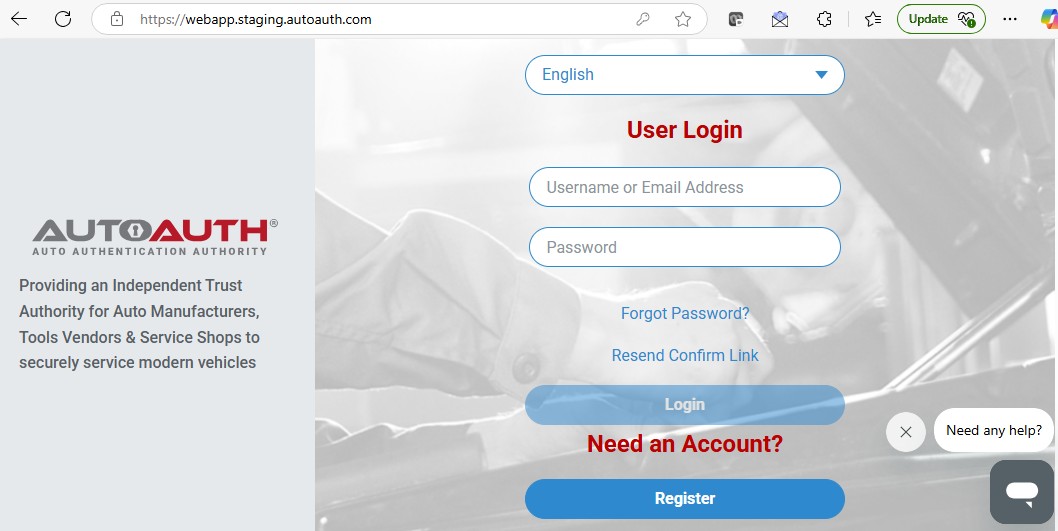
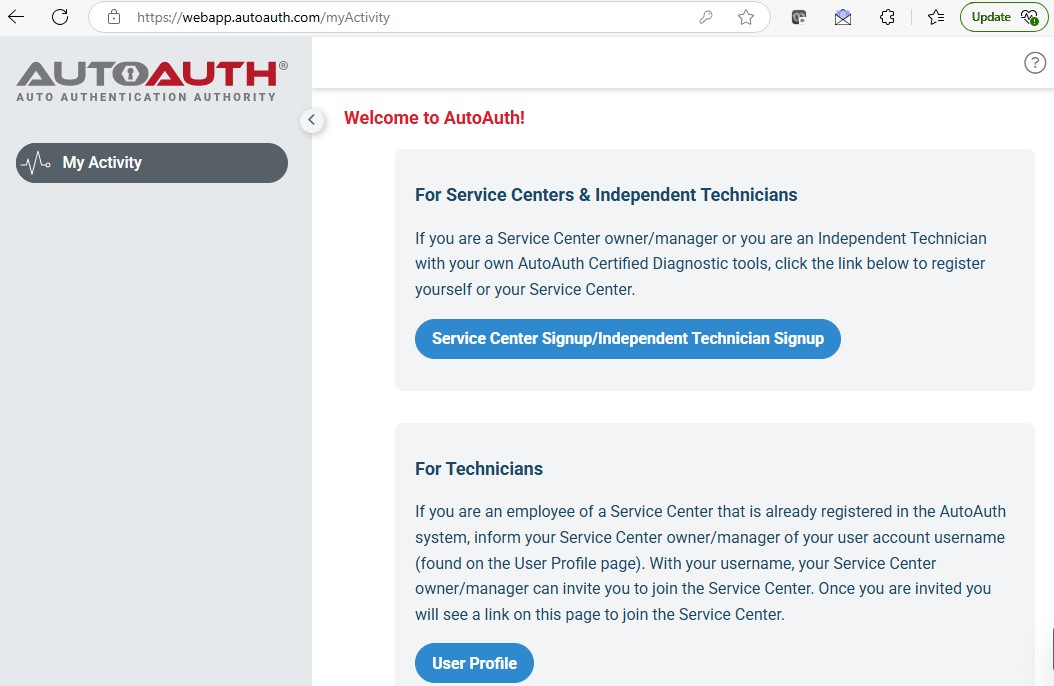
1) Register your WorkShop account at AutoAuth.com. There is a $50 Annual fee for each shop account. Five Users are allowed access on the shop account and you are automatically covered. You can select difference AutoAuth plan to cover more scan tools in your shop. 2) Register your Individual Technician Account: Register your individual user account at AutoAuth.com. Upon completion, inform your shop owner of your username and FCAR Scan Tool Serial number so they may add you to the shop account. |
|
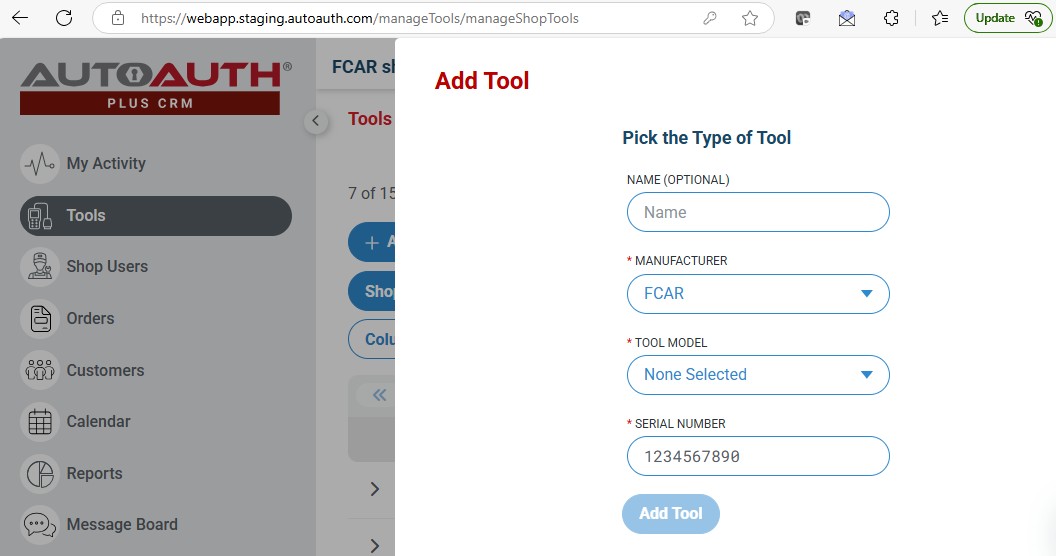
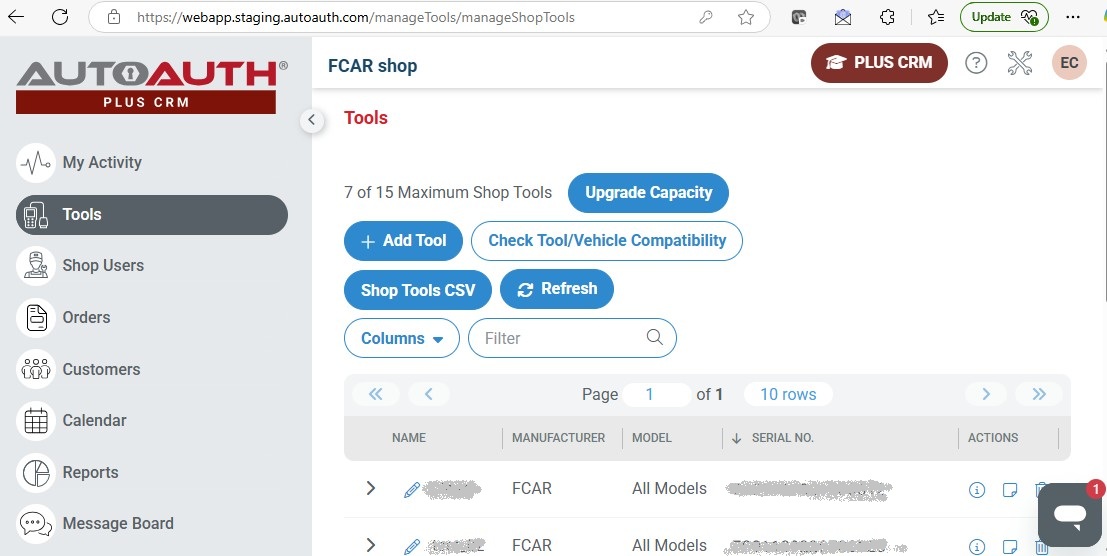
| Step 2: Login WorkShop Account, add your FCAR scanners to your shop profile, this enables all users in the shop account access to SGW with any FCAR scan tool added. |
|
|
The shop owner will be able to add the technician’s FCAR Scan Tools to the shop profile . This will allow all of the technicians in the shop to have access to the SGW with their FCAR Scanners. Select FCAR as the manufacturer and the appropriate tool model from the dropdown menu and the serial number. |
 |
| Step 3: This step ensures that you have the latest FCAR diagnostic software. | |
|
Get V9.70 or newer Chrysler (Dodge, Ram) software in update center if within subscription, or contact the dealer to renew. Update APK v25051015 or latest version:
|
|
| Step 4: Using FCAR tablet scanner to scan FCA vehicles | |
|
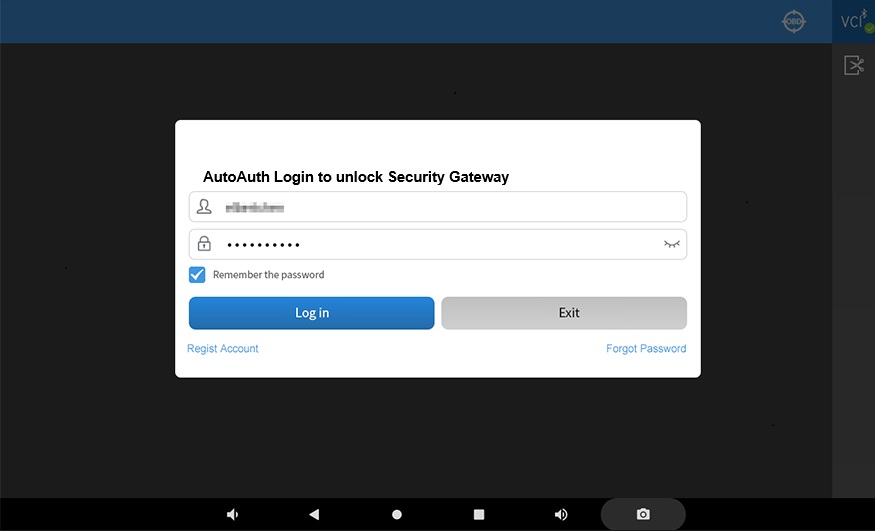
Before scanner vehicle, you need to connect your scanner into internet by Wifi or Hotspot. You can verify if the connection is good by open a public website by built-in browser or firefox. This step is the login prompt for the SGW where you will enter your valid login credentials from AutoAuth. Once you have entered your login, you would gain access to the SGW. |
 |
|
Series |
Style |
OS |
Screen |
Printer |
Battery |
Wifi |
Bluetooth |
COM |
Model |
|
F502 |
Palm |
FCAROS |
2.8” |
No |
No |
No |
No |
Cable |
F502 |
|
F506 |
Palm |
FCAROS |
3.5” |
No |
No |
No |
No |
Cable |
F506 |
|
F3S |
Book |
FCAROS |
8 Touch |
Built-in |
No |
No |
No |
Cable |
F3SN,F3SW,F3SG |
|
F6 |
Tablet |
Android |
8 Touch |
Cloud |
Yes |
Yes |
Yes |
VCI |
F6 Plus |
|
F7s |
Tablet |
Android |
10Touch |
Cloud |
Yes |
Yes |
Yes |
VCI |
F7SW, F7SN,F7SG |
|
Model |
F3SW (F3W) |
F3SN (F3N) |
F3N School Bus |
F3SG (F3G) |
|
Name |
Car Pro |
Truck Pro |
Truck Pro School Bus |
Master Pro |
|
Coverage |
Passenger vehicles |
LD/MD/HD trucks |
Cummins, Detroit, Cat and MaxxForce engines, Allison, Bendix, Eaton |
All included, All-in-one |
|
Protocol |
OBD1, OBD2 |
J1708, J1939 |
J1708, J1939, OBD2 |
OBD1, OBD2, J1708, J1939 |
|
Adapter |
Over 10 |
OBD16, Diesel 6-9 |
OBD16, Diesel 6-9 |
Over 20 |
|
MSRP |
$2000 |
$2995 |
$1900 |
$3495 |